From quote to order: your whole sales process in one CRM

Products, quotes and orders in one place, linked to clients, with clear statuses

Free Trial
Warehouse staff in hard hats shaking hands, one of them holding a parcel

Why manage sales in one system?

The quote is made in a spreadsheet, the order arrives by email and the invoice is issued in a third program – and meanwhile no one knows for sure where each quote stands. Every copy-and-paste increases the chance of mistakes, and details the client asks about later get lost.

In CoreCRM everything happens in one place, linked to the client – from your product and service catalog through quotes to orders. Statuses show where each quote stands, and once a quote is no longer a draft, you can turn it into an order with one click. With the Számlázz.hu integration you can issue the invoice from here too.

Three steps to going live

  1. 1

    Sign up

    A 30-day trial with no card details. The system is ready to use right after registration.

  2. 2

    Bring your data over

    Clients, products and services can be imported from Excel or your previous CRM, at no extra cost.

  3. 3

    Configure and go live

    Set up roles, departments, your email account and invoicing, then start working.

Product and service catalog with price, VAT, type and category

Your own product and service catalog

In the catalog you can organize your products and services into categories – even subcategories – and types, with net prices, VAT and currency. When quoting, you don't have to work from memory: you pick from the list, and the system calculates based on the prices you've set.

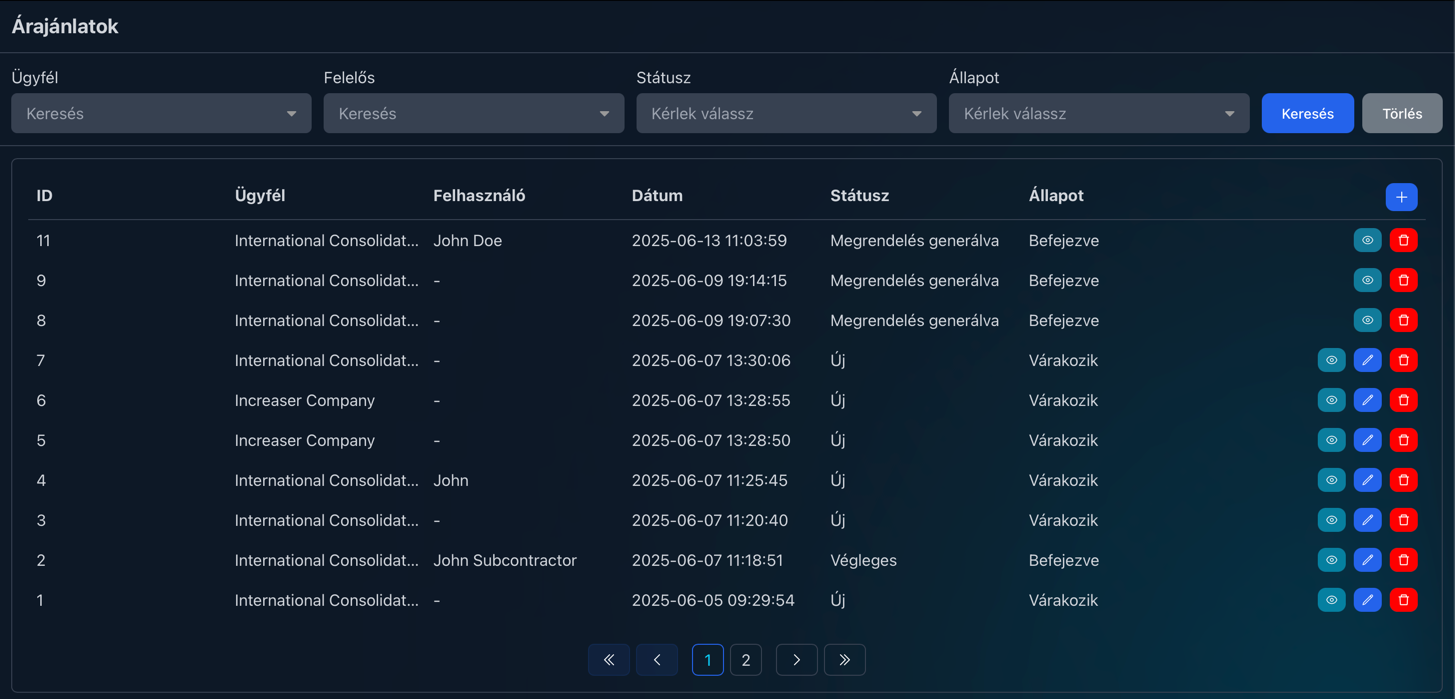
List of quotes filterable by client, owner and status

Every quote's status at a glance

You can filter the list of quotes by client, owner and status. The status shows where a quote stands – Draft, Sent, Accepted, Rejected or Order generated – and the owner shows who's handling it. The client's profile also lists all of their quotes and orders.

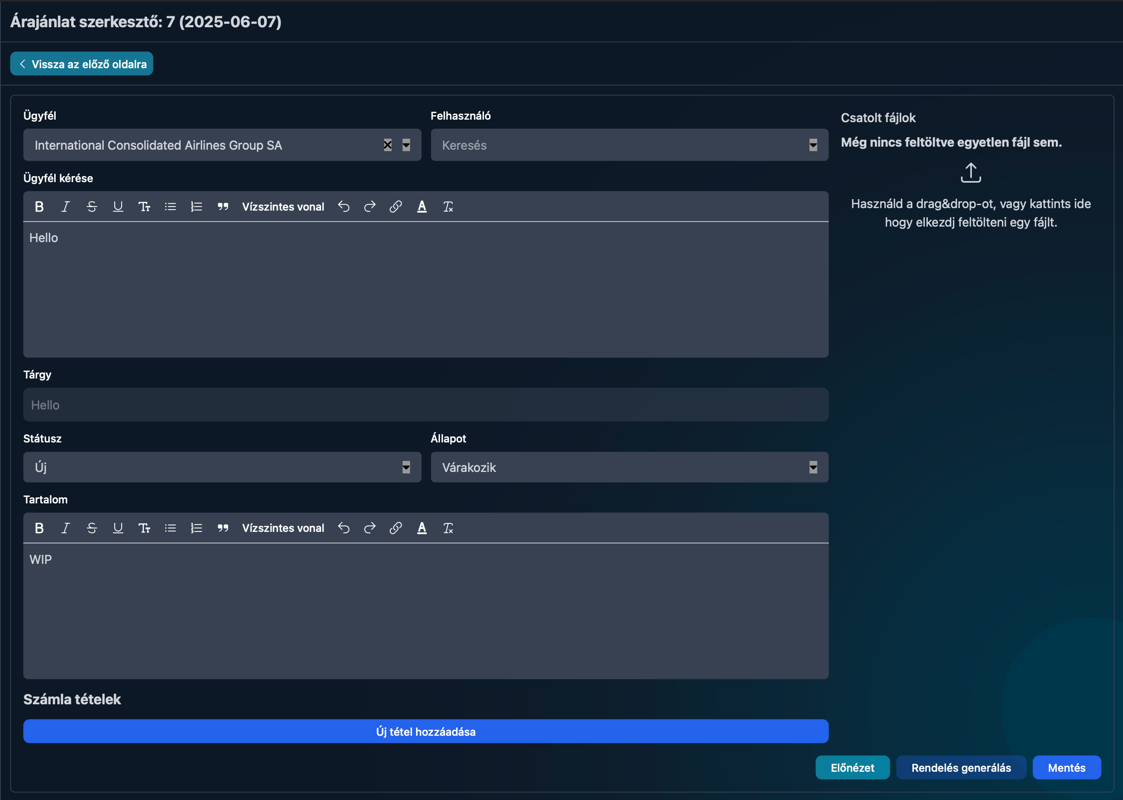
Quote editor with invoice line items, file attachments and order generation

Quotes with files and line items

In the editor you set the client, the owner, the client's request, the subject and the text of the quote, and attach files by dragging them in. With the Számlázz.hu integration you can also add invoice line items to the quote, and you can save the finished quote as a PDF or print it. You can even create a quote from an incoming email.

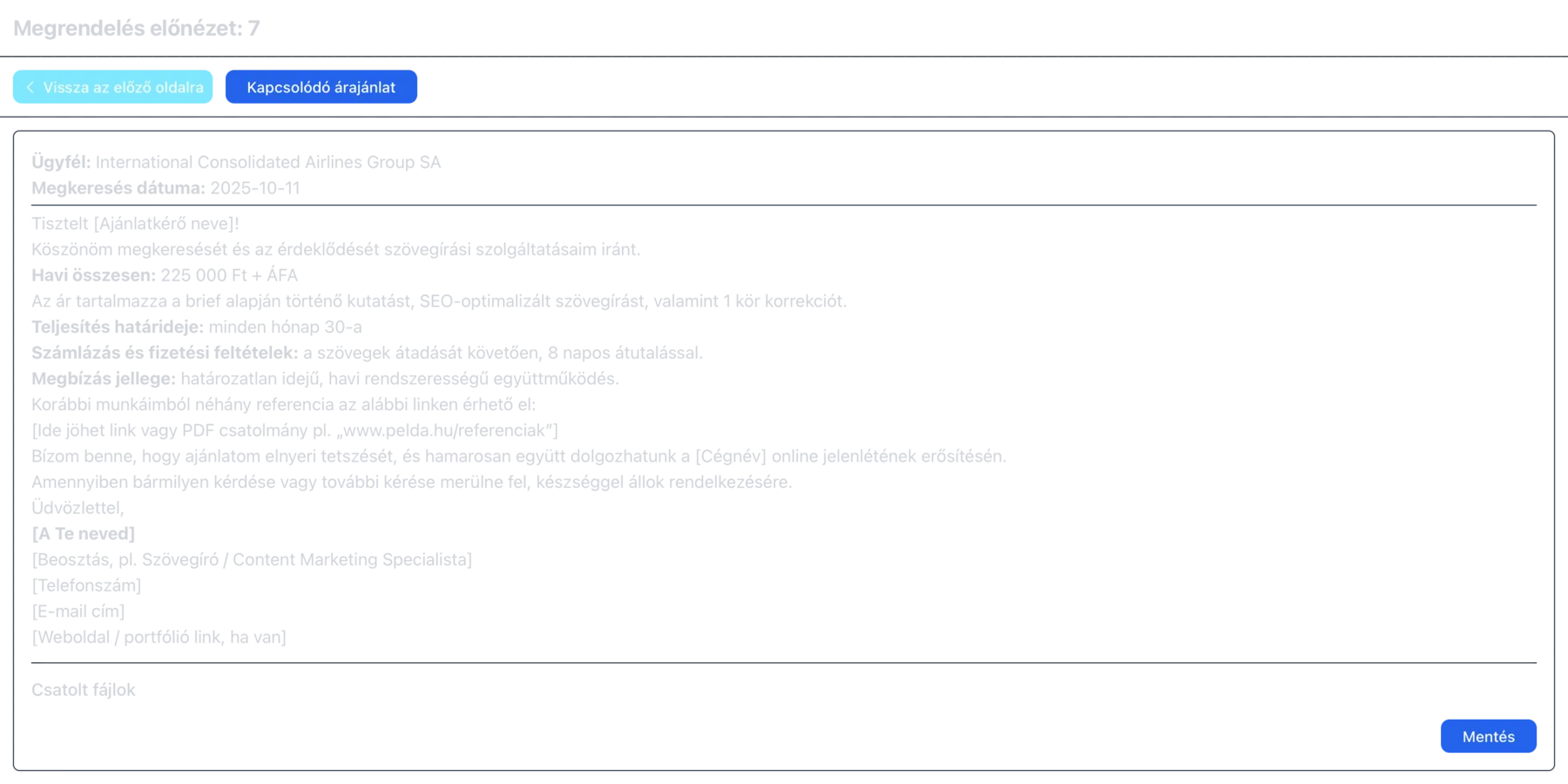
Order preview with a button to the related quote, the order text and attached files

Orders in one click

As soon as a quote leaves the Draft status, you can create an order from it at any time with the Generate Order button. The order takes over the quote's text but can be edited independently, and you can open the related quote from it with one click. The quote automatically gets the Order generated status and can no longer be modified, so the agreed terms don't change afterwards.

Real-world examples

What sales looks like at a few typical businesses

Plumber

Materials and fees for repair jobs are in the catalog, so the quote is ready within minutes after the on-site survey.

Catalog:
Repairs › Pipes, call-out fee
Process:
Survey → quote → order

Moving company

Moving packages and call-out fees are set in advance – you create the quote straight from the incoming email.

Catalog:
Moving packages, boxes, call-out
Process:
Email → quote → order

Air-conditioning installer

You track the quote sent after the survey in the Sent status, and once the client accepts it, it becomes an order in one click.

Catalog:
AC units, installation materials, labor
Process:
Survey → Sent → Accepted → order

Service business

For monthly services, the quote's text is carried over to the order, which you can save as a PDF and send to the client.

Catalog:
Monthly service packages
Process:
Quote → order → PDF

How the 30-day trial works

  • No card details: Signing up does not ask for any payment information.
  • The whole system: Every feature is available during the trial - you are not getting a cut-down version.
  • The whole team: You can invite your colleagues too, so you can decide based on real use.
  • No automatic charge: Without payment details no subscription starts on its own when the trial ends.
  • Your data stays: If you subscribe, you carry on with the data you entered during the trial.
Free Trial

Frequently asked questions about quotes and orders

Can I issue invoices from CoreCRM?

Yes, with the Számlázz.hu integration. Once you enter your Számlázz.hu API key in the company settings, the invoicing module appears, and you can issue invoices, pro forma invoices, advance and final invoices or receipts – even from the client's profile – as supported by your Számlázz.hu account.

How does a quote become an order?

Any quote that is no longer in Draft status can become an order: the Generate Order button creates the order with the quote's text, and the quote automatically gets the Order generated status and can no longer be edited.

Can I save a quote as a PDF?

Yes. Both quotes and orders can be saved as PDF or printed, and you can email them from the CRM as well.

What statuses can a quote have?

Draft, Sent, Accepted, Rejected or Order generated. You can also filter the list by status, so you see at a glance which quotes are still awaiting an answer and which have already become orders.

Can the sales process be automated?

Yes. With automated rules, a task, notification or checklist can be created when a quote or order is created or changes phase, and rules can create quotes or orders themselves.

Speed up your quoting

Try CoreCRM free for 30 days, no credit card required. We explain how to manage quotes and orders in detail in our Knowledge Base.

Free Trial
This website uses cookies to provide personalized content, analyze traffic, and improve site functionality. By clicking the "Accept" button, you consent to the use of cookies.