Welcome to the CoreCRM Wiki page
What is this page for?
Here, and in the left-hand menu (just like in the application), you will find help and descriptions of the features available in the application. We tried to describe in as much detail as possible what you can find where, what each feature is for, and how different functions build on each other.
However, it may happen that something is not completely clear, we did not provide enough explanation for a given function, or we did not highlight it sufficiently. In such cases, feel free to contact us at info@corecrm.hu, and also don’t hesitate to write to us if you would like to give us constructive feedback.
Remember, we created this page to help you, so if something is unclear, we’ll work on improving it.
What can you find here on the homepage?
On the homepage, we try to display simplified versions of those modules that we think are important for you to see right away when you log in.
For now, unfortunately, the appearance/layout of the homepage cannot be customized, but the development of this feature is planned.
Top row
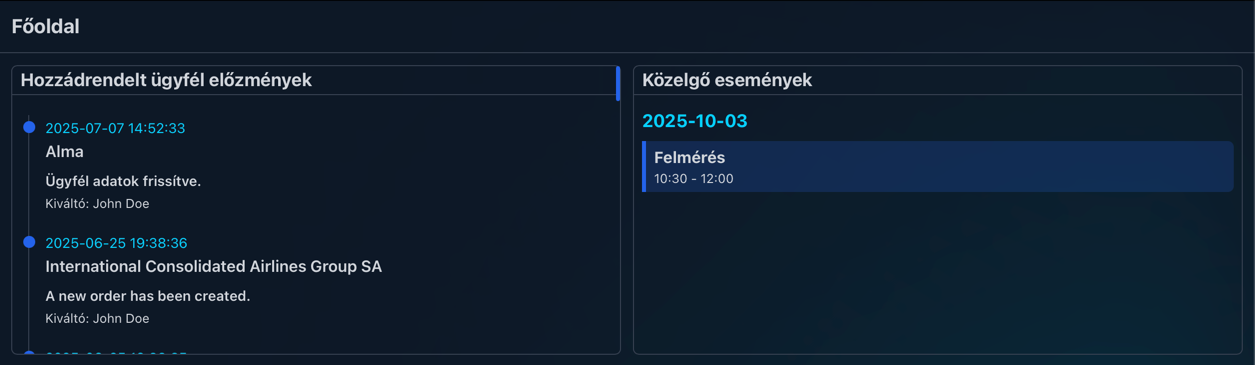
In the top row, you will find two blocks side by side. In the Assigned client history block, you will find the events related to clients who are associated with you.
What does it mean that they are associated with you? We explain this in detail in the clients menu item, but briefly: by default, you cannot see all clients. Each client can be assigned to one or more users, which authorizes them to view the client’s data and perform actions with them.
The Upcoming events block is a simplified view of the calendar module. Here you can see the events of the next 2 days. By clicking on an event (blue background block, labeled "Felmérés" in the image), you can view the event details.
Second row

In the next row, you will find a full-width block titled Tasks.
This is a complete copy of the tasks menu item. Here we will only briefly explain what this block is for; we cover it in detail on the tasks page.
In this block, you will find the tasks created either by others (or by yourself). By clicking on a specific row, you can view the details of the task, or if you’ve already completed it, you can mark it as done.
Important: on the homepage, you cannot create a new task or check the status of tasks you’ve created. For that, you need to navigate to the tasks menu item.