Invoicing in the CRM with the Számlázz.hu integration

Invoices, pro formas, advance invoices and receipts with the client details, no copying

Free Trial
Magnifying glass with a check mark surrounded by document and checklist icons

Why invoice from your CRM?

When the invoicing program and the client records live apart, you type the buyer's name, address and tax number again for every invoice and collect the items from a third place. Typos creep in, and it is hard to see which client has already paid.

CoreCRM issues the invoice through your Számlázz.hu account: you pick the client, the buyer details are filled in automatically, and you choose the items from your product and service list. The finished invoice also appears in Számlázz.hu, and in CoreCRM you see it on the client's page next to their quotes and orders.
How it works, in three steps

  1. 1

    Connect

    Enter the API key generated in Számlázz.hu once, in the company settings.

  2. 2

    Client and items

    Pick the client, the buyer details are filled in, and choose the items from your list or enter them yourself.

  3. 3

    Issue

    The invoice is created in your Számlázz.hu account, and from CoreCRM you can download it, send it and mark it as paid.

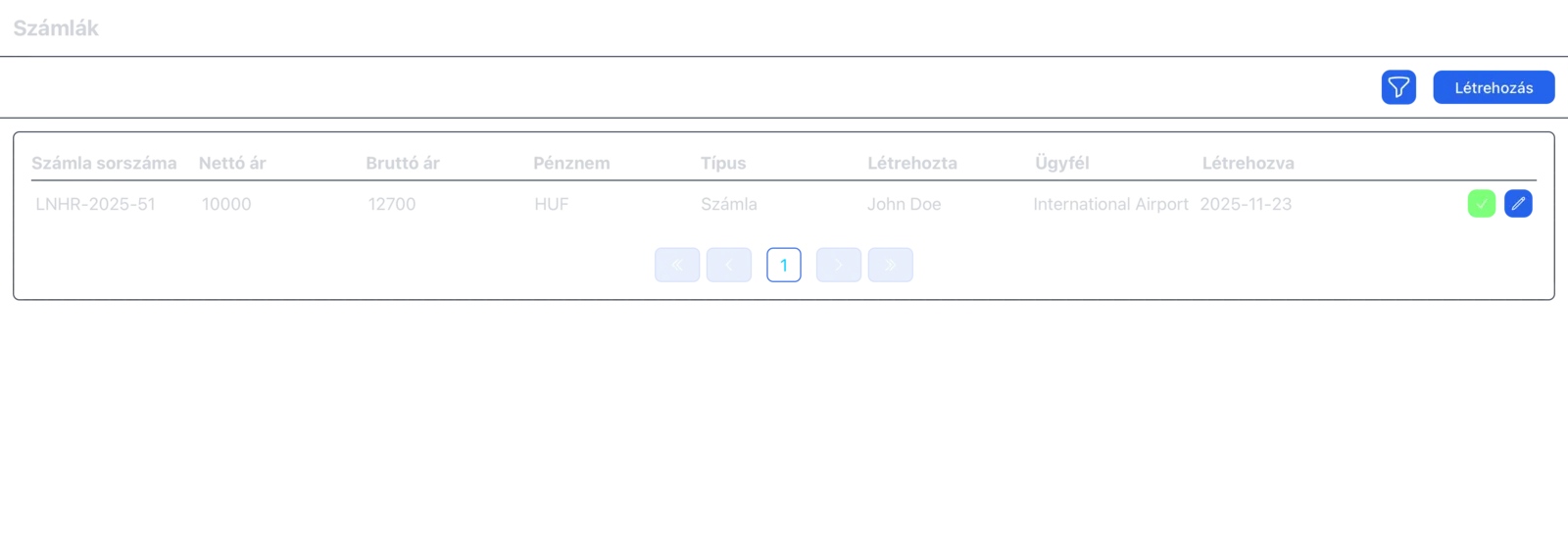
List of issued invoices with payment status

Every invoice and outstanding payment in one list

The Invoicing menu lists the invoices you have issued with their type, client, net and gross amount and currency. You can filter the list by client, invoice type, currency, issuer and payment status, so you see at a glance which invoice is still waiting for payment.

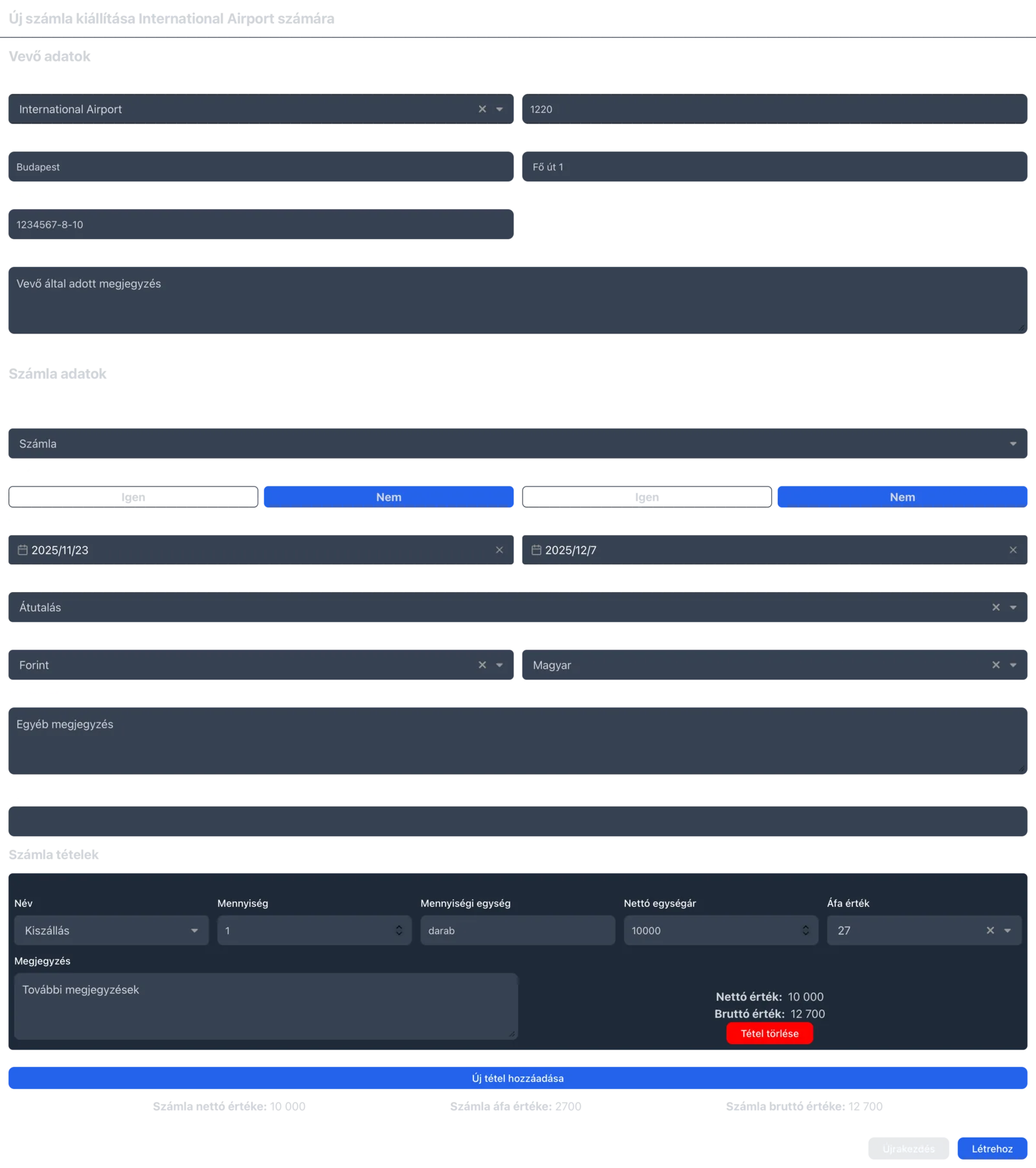
Creating an invoice with buyer details, invoice data and line items

Invoices, pro formas, advance invoices, final invoices and receipts

One screen issues invoices, pro forma invoices, advance invoices, final invoices and receipts. You set the delivery date, the payment deadline, the payment method (bank transfer, cash, bank card or cash on delivery), the currency and the invoice language, and if your Számlázz.hu plan includes it, you can ask for an e-invoice. You choose the items from your product and service list, but you can also add a custom item with quantity, net unit price and VAT rate.

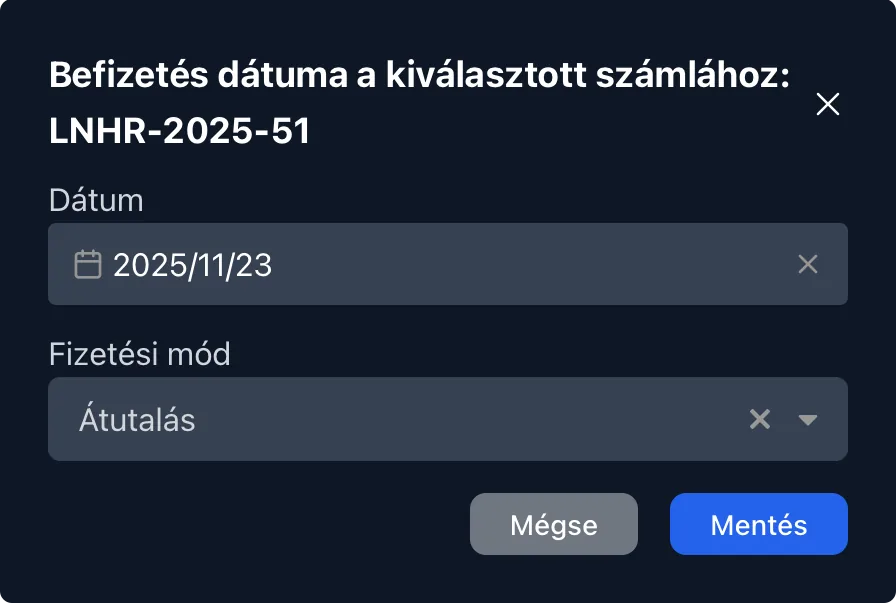
Marking an invoice as paid with payment date and method

Payment, cancellation and sending by email

When the client has paid, you can mark the invoice as paid in a few clicks, together with the payment date and method. You can cancel a wrong invoice from the list, download any invoice as a PDF, and if you have connected your own email account, send it to the client from the CRM.

What you gain

  • No double data entry: The buyer details come from the client record and the items from the product and service list.
  • Fewer typos: You don't copy the name, address and tax number by hand.
  • Clear outstanding payments: The list shows which invoices have been paid and which are still waiting.
  • One program instead of two: You don't leave the CRM to invoice, yet every invoice issued here is in Számlázz.hu too.

Invoicing costs nothing extra: it is included in the 10,000 HUF monthly fee.

Frequently asked questions about invoicing

Which CRM systems support Hungarian invoicing?

Several CRM systems work with Hungarian invoicing programs, but they differ in whether they offer built-in invoicing, an integration or an external add-on, and in which plan. CoreCRM works with Számlázz.hu, and this is included in the monthly fee at no extra cost.

What do I need for the Számlázz.hu integration?

A Számlázz.hu account and the API key generated there, which you enter in the CoreCRM company settings. Only users whose role allows it see the invoicing module.

Do I pay extra for invoicing?

Not in CoreCRM: invoicing is included in the 10,000 HUF monthly fee. If your Számlázz.hu plan has a fee, you keep paying that to Számlázz.hu.

What kinds of invoices can I issue?

Invoices, pro forma invoices, advance invoices, final invoices and receipts, plus a cancellation invoice for an issued one. E-invoices and receipts work if your Számlázz.hu plan includes them.

Do invoices issued in Számlázz.hu show up in CoreCRM?

No. Invoices issued in CoreCRM go to your Számlázz.hu account, but there is no sync the other way: invoices created directly in Számlázz.hu don't appear in CoreCRM.

Does it work with Billingo?

Not at the moment; CoreCRM works with Számlázz.hu.

Issue your first invoice from the CRM

The setup steps are described in the invoicing knowledge base article.

Free Trial
This website uses cookies to provide personalized content, analyze traffic, and improve site functionality. By clicking the "Accept" button, you consent to the use of cookies.